¿Cuántos datos usa FaceTime?
Por el equipo Ultra
Published marzo 31, 2026
FaceTime is a popular iPhone app that allows users to make audio and video calls using mobile data instead of their allotted talk minutes. This means if you’re calling friends on FaceTime regularly, you could be using a lot of your monthly high-speed data. This can also vary depending on Wi-Fi accessibility and whether you’re making audio or video calls. How much data does FaceTime use? It all depends on how you use FaceTime.
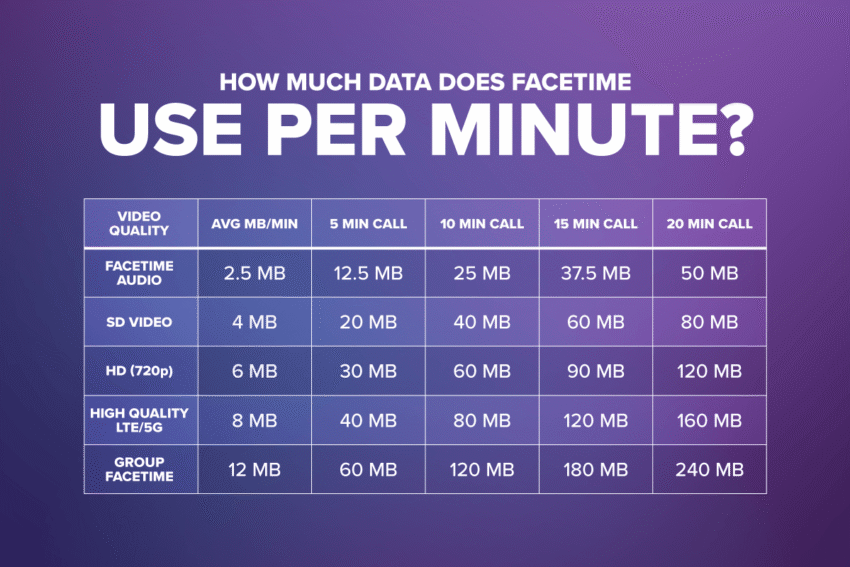
How much data does FaceTime use per minute?
Just like streaming movies uses more data than streaming music, video calls over FaceTime use more data per minute than audio calls. Being able to estimate your per-minute usage can help you decide how much data you need per month.
- Audio calls use approximately 2-3MB per minute
- Video calls use approximately 3-7MB per minute (at standard quality)
- Increasing the quality of your video call will use more data
- Group calls also require more data, since they include multiple streams
- For example: a FaceTime call between two people includes connections from person A to person B and person B to person A (two directions), while a call between three people includes connections from A to B, A to C, B to A, B to C, C to A, and C to B (six directions).
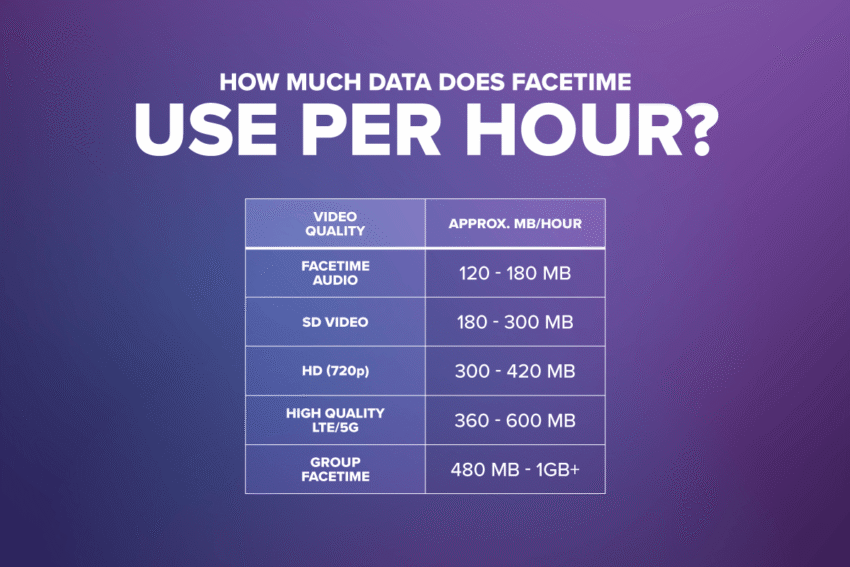
How much data does FaceTime use per hour?
Using the per-minute numbers above, it’s easy to determine approximately how much data you’re using per hour, depending on how you’re using FaceTime.
- Audio calls use approximately 120-180MB per hour
- Standard definition video calls use approximately 180-300MB per hour
- HD (720p) video calls use approximately 300-420MB per hour
- Higher quality video calls (with strong 5G or LTE signal) will use more data
- Group video calls can use approximately 480MB to over 1GB of data per hour
Keep in mind, this is just an approximation and your FaceTime data usage can vary a bit based on your device, network strength and usage settings.
How to check FaceTime data usage on iPhone
You can view how much total data FaceTime is using on your device by going into your Settings menu and following just a few steps:
- From Ajustes, seleccionar Celular o Datos móviles
- Desplácese hacia abajo para FaceTime and select it to view the app’s total data usage
- “Current Period” doesn’t automatically reset each month, so scroll to the bottom of the Cellular menu and select “Reset Statistics” to refresh this
You can also see how much data was used on just a single FaceTime call:
- Open the FaceTime app and select Recientes
- Haga clic en el “i” next to the contact you spoke with via FaceTime
- If this FaceTime call used your mobile data, the amount will be noted next to the timestamp of this call
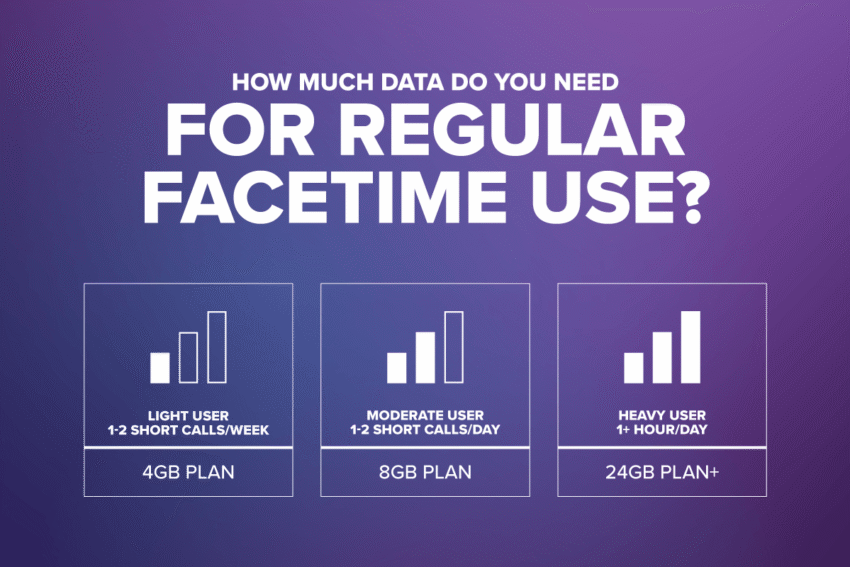
How much data do you need for regular FaceTime use?
When purchasing a wireless plan, it’s important to know how much data you’ll need each month to keep you connected. Keep in mind, FaceTime isn’t the only thing on your iPhone that uses data, so you’ll want to take into account music and video streaming, social media, gaming, emails and other apps that connect to the internet as well.
- A light user, making one or two short FaceTime calls per week, would probably be safe going with a 4GB plan
- A moderate user, making short FaceTime calls daily, may want to go for the 8GB plan
- A heavy user, spending upwards of an hour a day on FaceTime, should consider at least a 24GB plan
- If most calls are HD quality or group calls, you may want to look into an Unlimited data plan
Of course, this is still an approximation. And you may be able to get by with a lower data plan if you implement a few tricks to lower your FaceTime data usage.
How to reduce FaceTime’s data usage
There are a few ways to use less data when using FaceTime on your iPhone: most include changes to your FaceTime settings, but the easiest is to just make FaceTime calls over Wi-Fi.
- How to make FaceTime calls over Wi-Fi
The simplest way to use less of your monthly data is to do most data-heavy things while connected to Wi-Fi. When you’re using the internet via Wi-Fi, it isn’t pulling from your mobile data allotment. FaceTime knows this and prefers Wi-Fi as well. So if you’re connected to Wi-Fi when you make a FaceTime call, it will default to using your Wi-Fi connection. However, if your Wi-Fi becomes unstable, it will automatically switch to your cellular data to stay connected.
If you want to ensure FaceTime uses none of your cellular data, you can set it to only work via Wi-Fi:
- From Ajustes, seleccionar Celular o Datos móviles
- Desplácese hacia abajo para FaceTime and toggle it off
- Keep in mind, this means you won’t be able to make or receive FaceTime calls unless you’re connected to Wi-Fi.
- How to turn off video on FaceTime
Making an audio-only FaceTime call uses significantly less data than a video call, so if being seen isn’t important to you, turning your camera off while on FaceTime can save you some data.
- While in an active FaceTime call, tap the screen to open the FaceTime menu
- Swipe the menu up to reveal more options
- Seleccionar Camera Off to turn your camera off
- You’ll still be able to see the person you’re speaking to if their camera is on, but you may politely ask them to turn their camera off too, which will save you both even more data.
- Lower the video quality
A standard definition video call certainly uses more than an audio-only FaceTime call, but it also uses significantly less data than an HD video call.
- From Ajustes, seleccionar Celular o Datos móviles
- Desplácese hacia abajo para FaceTime y seleccione Use Lower Quality for Smoother Calls
- Avoid group calls
As we mentioned previously, group video calls use a lot more data due to the number of streams being managed simultaneously. We recommend waiting to jump on group video calls until you’re on a stable Wi-Fi network.
Take time to track your data usage over FaceTime
In summary, the amount of data FaceTime uses depends on how you use FaceTime. HD video will use more than standard quality video, which uses more than audio-only FaceTime calls. All of which use no data when you’re using FaceTime over Wi-Fi. But if there’s one thing you take away from this blog, it should be that keeping an eye on your data usage is vital to ensuring you have the data you need each month. Knowing your habits can help you choose the right plan, and choosing the right data plan means fewer surprises down the road. Ultra Mobile has plans to meet anyone’s data needs, from those who only talk & text to those who require unlimited data, and everyone in between. So after you take a look at your FaceTime data usage in your iPhone settings, click below to see how much you could save with the right Ultra Mobile plan for you.